Warhounds Recruitment, Medical Care, and Downtime Guide
Use a practical Warhounds hiring checklist, compare recruits with veterans, separate roster capacity from deployment slots, and plan equipment and recovery.
Before hiring in Warhounds, compare the available candidate with the next mission: check the class and abilities the current interface shows, any displayed hiring requirement or price, the equipment you can provide, and who the recruit would replace. Official material confirms generic recruits alongside ten unique veterans, plus treatment and downtime between operations.
This page owns recruitment flow, candidate comparison, roster-capacity boundaries, and recovery planning. Use the veterans overview for named-character evidence and the classes overview for class roles and class-specific mechanics.
Exact veteran unlock conditions, hiring prices, pool refresh rules, the numeric maximum roster, and recovery durations are not established by the current official source set. The following routine is a decision flow rather than a claim about exact button names; use the requirements and values displayed in your installed build.
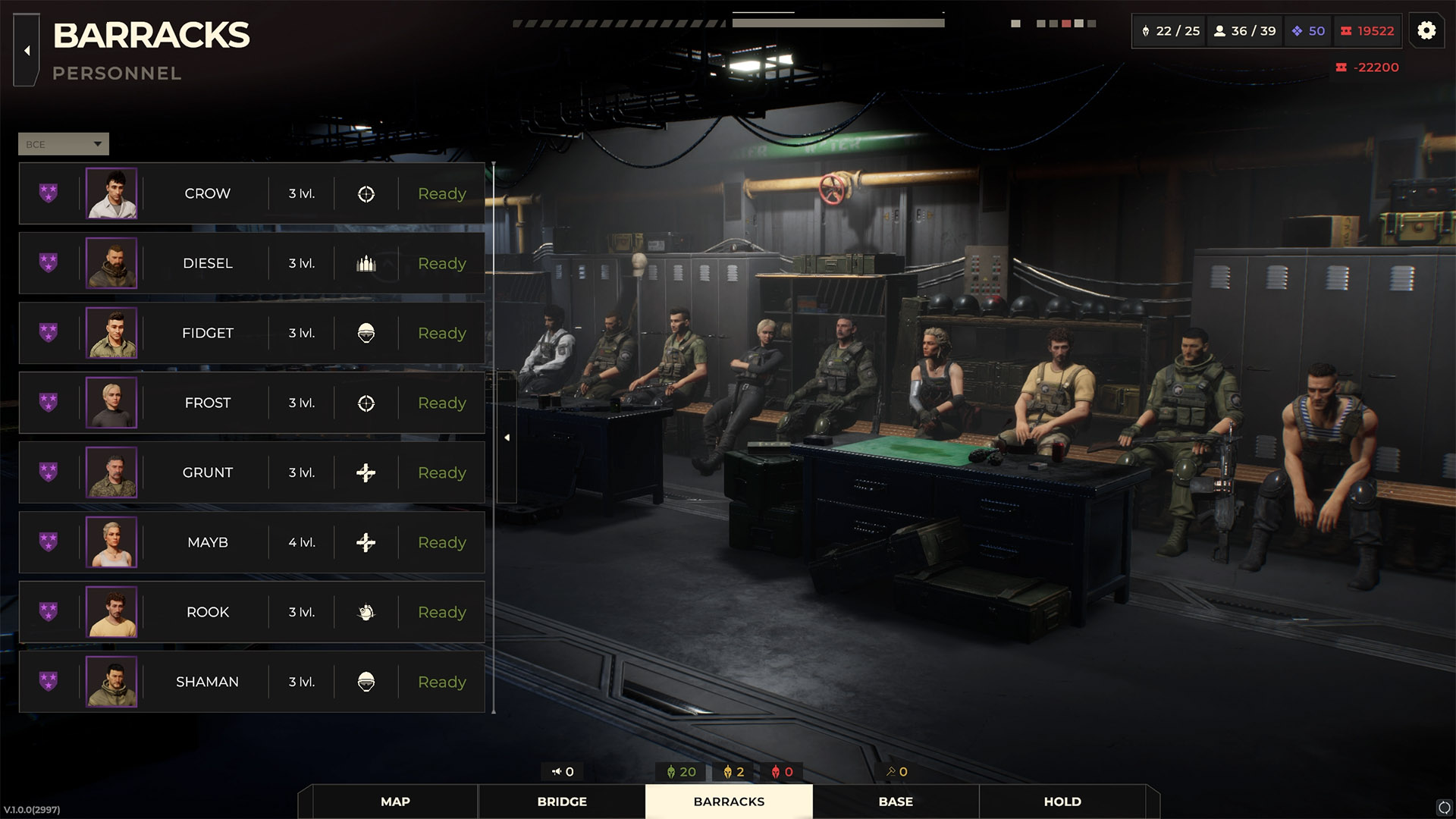
Use the Barracks list to compare the operative’s callsign, portrait, level, class icon and readiness before hiring or deploying. Official press-kit screenshot, version 1.0.0 (2997). View full-size image. Image: Everplay DMCC / Brightika, Inc., via the official press kit.
Warhounds recruitment: a hiring checklist
Use this sequence when recruitment is available in your campaign:
- Choose the vacancy first. Identify the next mission and the job an unavailable operative would normally cover. A replacement should solve that problem.
- Inspect the offered candidate. Read the displayed class, attributes and ability descriptions. Compare actual information rather than assuming a veteran’s callsign describes their role.
- Check the hiring requirement and price. If hiring is unavailable, look for an explanation in the interface before spending money elsewhere. This guide does not assume that a missing option always means insufficient funds or a full roster.
- Budget for a usable loadout. Compare the equipment you already have with what you intend to give the recruit, and leave room for the recovery needs already visible at base.
- Review the operative after hiring. Inspect the equipped weapon, armor and utility items before selecting them for a mission. Check ability costs and conditions against the gear you actually intend to use.
- Recheck the deployment team. Confirm who is available for this operation. Hiring someone and fitting them into a particular mission’s squad are separate decisions.
This is a decision checklist, not a claim about exact button names or a fixed tutorial hiring quota. For the broader opening routine, see first session and base setup.
Recruits, veterans and capacity are different questions
| Question | What is confirmed | What to use in your campaign |
|---|---|---|
| Are recruits and veterans both available as roster types? | The official website describes recruits and ten unique veterans | The candidates and requirements currently displayed |
| Is there a maximum roster? | All the King’s Men rewards hiring the maximum number of soldiers | The capacity information in your game; the achievement gives no number |
| Can I hire all veterans? | Gang’s All Here is the achievement for hiring all veterans | Your recruited characters and remaining available offers |
| How many can enter one mission? | Roster achievements do not establish deployment slots | The squad selection for that specific operation |
Do not use a full roster, a full deployment team or an unavailable veteran offer as interchangeable explanations. Each concerns a different part of preparation. The veterans guide covers character choices and the recruitment achievement.
Recruit for coverage and rotation
Roster depth is useful when it reproduces essential battlefield jobs. Before hiring, identify which of these would disappear if one operative became unavailable:
- reliable lane control;
- safe flank creation;
- information gathering;
- protection or recovery support;
- mission-specific utility.
A recruit who overlaps one job but solves it differently can be more useful than a duplicate loadout. For example, if your only information tool would leave with an unavailable operative, review whether another equipped team member can cover that task before buying a second damage-focused loadout.
Can I choose a new recruit’s class?
Major Update 1.0.2 released on September 24 and added the ability to choose a class for rookies. This promotes the roadmap feature from planned to released, but the release note does not publish the button name, cost, timing, or every eligibility rule.
Do not extend “rookie class selection” into a veteran retraining system, post-hire class-change mechanic, or a guarantee that every candidate can freely switch class. Use the current recruitment interface for the specific rookie being hired. See classes and squad roles for the five official class names and ability checks.
Make medical decisions before deployment
The safest treatment plan starts in the mission-selection screen. Check whether a contract’s likely rewards justify deploying a partially recovered specialist when a healthier squad can complete a lower-risk objective.
Use a simple readiness state:
- Ready: suitable for the planned objective according to the live game status.
- Limited: available, but an injury or missing equipment narrows safe roles.
- Recovering: better kept in treatment or downtime unless the campaign demands otherwise.
These are planning labels, not official status names. Follow the current UI for actual restrictions and penalties.
Treat extraction as a valid result
Official material explicitly mentions treating, extracting, and protecting operatives. If the mission state has become unrecoverable, preserving trained personnel may be worth more than optional kills or loot.
Before continuing a failing engagement, compare:
- the remaining primary objective;
- the route and conditions for extraction;
- the risk to injured or isolated operatives;
- the cost of losing a unique tactical capability;
- whether another mission can advance the campaign more safely.
Exact extraction rules vary by mission and must be read from the live objective panel.
Use downtime to maintain options
Downtime is part of the strategic layer, so schedule missions around the whole roster rather than waiting for one favorite squad. Alternate veterans, generic soldiers, and equipment packages when possible.
Before the next deployment, review the soldiers you intend to use, the equipment assigned to them and any recovery still needed. The base management guide covers the finances and expansion that support this routine.
Frequently asked questions
How many soldiers can I hire?
The public achievement confirms that a maximum roster exists, but this guide does not publish a number without direct 1.0 verification.
Are there exactly ten recruitable veterans?
Official material advertises ten unique veterans, and a public achievement rewards hiring all veterans. Their recruitment order and conditions may contain spoilers.
Why did hiring all veterans not unlock the achievement?
The August 31 Hotfix #6 notes include a fix for the all-veterans recruitment achievement failing to unlock. Check your installed version before assuming you missed a character. The announcement does not say whether the fix awards the achievement retroactively in every affected save. More troubleshooting is in the veterans guide.
When does a particular veteran become available?
This guide does not have a verified per-character unlock schedule. Check the offers and requirements shown in your campaign. A veteran mentioned in dialogue, a community ranking or a modified-game screenshot does not establish when you can hire them.
Should I always finish a mission after someone is injured?
No universal rule applies. Compare the objective, extraction conditions, and campaign value of preserving the operative.
Sources & Verification
- Official — currentWarhounds on SteamSteam / Warhounds · Checked September 28, 2026
- Official — currentWarhounds Official WebsiteWarhounds · Checked August 18, 2026
- Official — currentWarhounds Global AchievementsSteam · Checked September 6, 2026
- Official — currentWarhounds: First Hotfix & Two New BundlesSteam / Warhounds · Checked August 20, 2026
- Official — currentWarhounds Roadmap: What's Coming in 2026 and BeyondSteam / Warhounds · Checked September 28, 2026
- Official — currentHotfix #6: Fixes and ImprovementsSteam / Warhounds · Checked September 6, 2026
- Official — historicalWarhounds official press kit and downloadable media assetsgame.press / Brightika, Inc. / Everplay DMCC · Checked September 15, 2026
- Official — currentMajor Update 1.0.2 Is Live!Steam / Warhounds · Checked September 28, 2026