Warhounds Classes Overview: Build a Balanced Squad
Meet the five Warhounds classes, plan squad roles, check Grenadier equipment, and understand released rookie class selection and the Sniper AP fix.
Warhounds has five officially named classes: Assault, Specialist, Sniper, Machine Gunner, and Grenadier. For your next mission, choose operatives by the equipment and abilities they can actually use, then cover the objective’s needs: firing lines, movement, information, and protection.
Looking for a particular class in recruitment? Major Update 1.0.2 released on September 24 and added rookie class selection. The release note confirms that feature but does not document a veteran retraining system or every UI step.
This page owns class names, battlefield roles, and class-specific mechanics. For named-character and veteran evidence, use the veterans overview. For hiring steps, displayed requirements or prices, total roster capacity, and recovery decisions, use recruitment, medical care, and downtime.
The five classes
The Steam store and official website confirm Assault, Specialist, Sniper, Machine Gunner, and Grenadier. They also describe customizable weapons, gear, abilities, and tools including drones, combat scanners, smoke, and optical camouflage.
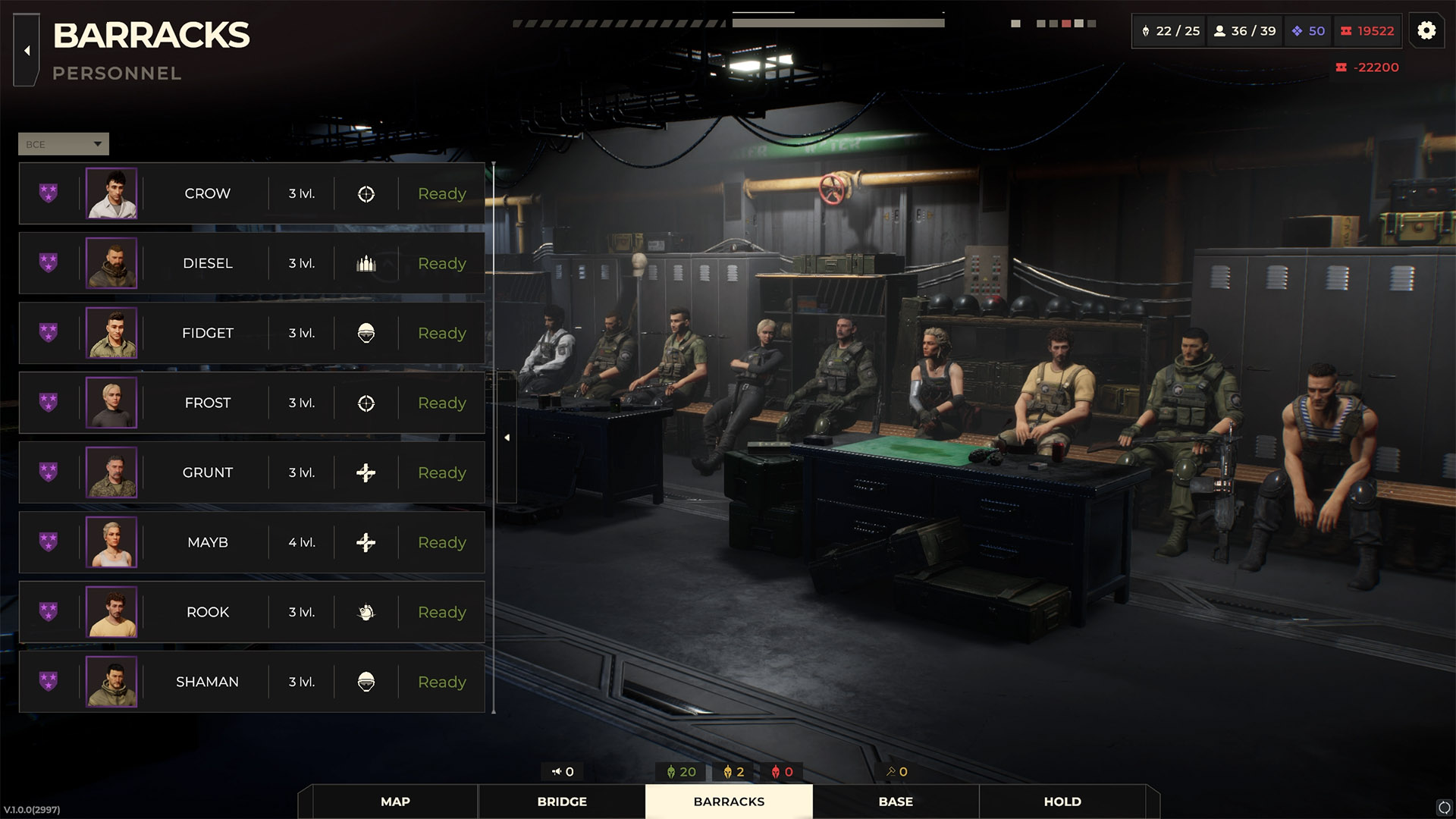
The Barracks personnel view puts portraits, levels, class icons and readiness together for a squad review. Official screenshot, version 1.0.0 (2997). View full-size image. Image: Everplay DMCC / Brightika, Inc., via the official press kit.
The sources listed below do not provide a complete class skill tree or a table of class-specific equipment restrictions. Use the operative’s equipment and ability descriptions for those details. A class name alone does not establish that an operative can equip a particular weapon, use a particular gadget, or unlock a skill at a certain level.
How do I get a Grenadier or choose a recruit’s class?
Major Update 1.0.2 now supports choosing a class for rookies. The final release announcement does not state the exact menu label, whether every recruitment offer is a rookie, whether class choice has a cost, or whether a class can be changed again after the choice is made.
There is still no official evidence here for veteran retraining or a general post-hire class-change route. Do not apply the rookie feature to veterans or existing operatives without current interface evidence.
For the hiring decision itself, use recruitment, medical care, and downtime. For unique characters, see the veterans overview.
Grenade launcher option missing: what to check
A missing attack option does not by itself identify a Grenadier bug. Work through these checks before changing your squad or buying replacement equipment:
- Read the weapon description. Look for any stated class, equipment, or ability requirement; owning a launcher does not prove that the selected operative can use it.
- Check the selected operative’s loadout. Confirm which weapon is equipped and whether the item needs ammunition or another equipped component.
- Read the attack or ability tooltip. Compare its displayed requirements with the operative’s remaining action points and the selected target.
- Compare another valid target or position. This helps distinguish an unavailable action from a target or line-of-fire problem.
- Keep the exact details if the problem persists. The operative, weapon name, tooltip, target, and installed version make a support report much more useful than “Grenadier does not work.”
These are troubleshooting checks, not a verified list of launcher restrictions. The weapons and equipment guide covers how to compare loadouts by function.
Sniper abilities and incorrect action points
The official August 31 Hotfix #6 notes list a fix for action-point calculation when combining Sniper abilities. If an older guide’s combination leaves a different number of action points in your game, check the installed version and the abilities’ displayed costs before building a turn around it.
For a continuing problem, record the ability order and the action points before and after each use. The patch note confirms a developer-listed fix; it does not publish a full ability-cost table or establish that every Sniper interaction behaves identically.
Build a squad around battlefield jobs
Use this checklist before deployment. It describes planning priorities rather than assigning unverified abilities to each class.
| Battlefield job | Question to answer |
|---|---|
| Lane control | Who can watch or contest an important approach? |
| Flank creation | Who can reach a better angle without exposing the whole squad? |
| Information | Who can use an available drone or scanner to reduce uncertainty? |
| Protection | Who can help an exposed ally or protect the objective route? |
| Recovery plan | Who can still finish the objective if the first attack fails? |
One operative may cover several jobs, depending on their equipment and abilities. If your only way to reach an objective depends on one soldier staying healthy, consider a second option before committing to the mission.
Redundancy does not require identical loadouts. For example, available smoke can help with movement while a scanner helps you plan the route. Check which tools your squad can carry and use, then spend on the gap that remains.
Match composition to the objective
Public achievements identify Sweep, Capture, Escort, Rescue, Joint Operation, reconnaissance, and covert activities. Use the briefing to decide which capabilities matter most:
- Sweep-style combat: plan safe movement between engagements and sustainable firing positions.
- Capture: preserve control tools and a route to the target instead of spending everything on early damage.
- Escort or rescue: protect the route and keep a fallback position between the objective and likely threats.
- Joint operations: make sure your squad can complete its own job if allied units cannot cover a gap.
- Reconnaissance: weigh information and the campaign outcome alongside enemy removal.
These are general squad-planning recommendations. The mission’s displayed rules and available deployment slots take priority over a fixed team template.
How many operatives can I deploy?
Check the deployment screen for the mission you are about to start. In a July 15 pre-release developer reply, the developer said that some missions use different squad sizes and that drones can be added to a squad. The reply does not establish a universal retail cap or explain whether a drone uses an operative slot.
Four should therefore not be treated as a confirmed limit for every mission. Hiring more soldiers and filling one mission’s deployment slots are separate decisions.
Is there a best class?
The official material does not provide a class ranking. Compare the mission, usable equipment, available abilities, and the health of your roster. A second operative who covers a missing job can be more useful to your next deployment than a highly ranked character whose equipment duplicates what you already have.
For the first campaign decisions, follow the first two hours guide, then return to this checklist as recruitment and equipment options expand.
Sources & Verification
- Official — currentWarhounds on SteamSteam / Warhounds · Checked September 28, 2026
- Official — currentWarhounds Official WebsiteWarhounds · Checked August 18, 2026
- Official — currentWarhounds Global AchievementsSteam · Checked September 6, 2026
- Official — historicalWarhounds developer reply — mission squad sizes and dronesWarhounds developer on Steam · Checked August 22, 2026
- Official — currentWarhounds Roadmap: What's Coming in 2026 and BeyondSteam / Warhounds · Checked September 28, 2026
- Official — currentHotfix #6: Fixes and ImprovementsSteam / Warhounds · Checked September 6, 2026
- Official — historicalWarhounds official press kit and downloadable media assetsgame.press / Brightika, Inc. / Everplay DMCC · Checked September 15, 2026
- Official — currentMajor Update 1.0.2 Is Live!Steam / Warhounds · Checked September 28, 2026