Warhounds First Session: Saves, Missions and Base Setup
Follow a release-version Distant Smoke walkthrough, then prepare Warhounds saves, recruitment, equipment, base setup, and the Workshop Recon Drone unlock.
Start your first Warhounds session by choosing a save mode, reading each mission’s completion conditions, and checking the squad before deployment. When base management becomes available, review recruitment, equipment and recovery before accepting another operation. Building the Workshop unlocks the Recon Drone directly under the Patch 1.0.1 rules.
This guide gives a practical preparation routine and one reproducible opening mission: Distant Smoke. The walkthrough below is anchored to a complete full-release 1.0 recording and cross-checked against a separate Veteran-difficulty 1.0 run. It does not assume fixed enemy positions, damage rolls, or turn counts, and it is not presented as a Major Update 1.0.2 live-build retest.
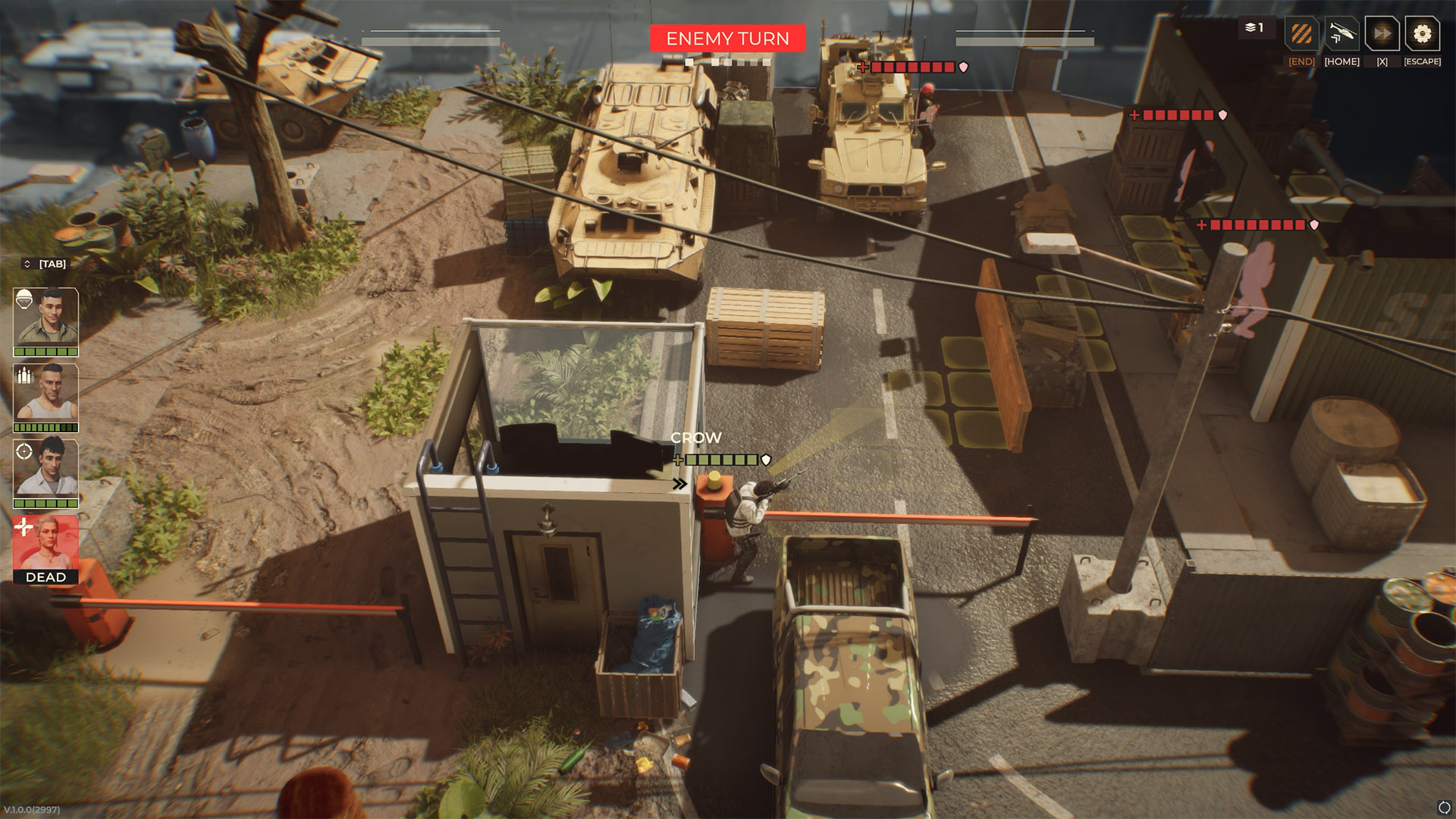
The tactical view shows squad portraits, cover and the enemy-turn state that you should read before planning the next action. Official press-kit screenshot, version 1.0.0 (2997). View full-size image. Image: Everplay DMCC / Brightika, Inc., via the official press kit.
Distant Smoke walkthrough
Scope and prerequisites
Distant Smoke is the opening mission named by Steam’s public Welcome to Africa achievement. In the primary recording, new-game setup begins before the mission briefing, so there is no base-building or recruitment prerequisite to reproduce this covered segment.
The primary evidence is RonEmpire’s full-release 1.0 recording. The creator labels the video Version 1.0 Full Release; YouTube metadata checked on September 15 reports an August 14 upload, while the spoken introduction says August 12. The difficulty used in that recording is not established by the evidence retained this round. A separate Neyreyan 1.0 Veteran-difficulty run, published August 17, reproduces the same objective sequence.
Version boundary: this is release-version mission evidence, not a current Major Update 1.0.2 gameplay capture. If your current objective panel differs, follow the live objective text rather than an old enemy route or turn count.
Major Update 1.0.2 separately says manual extraction on story missions is now disabled. That release-note fix does not invalidate Distant Smoke’s scripted helicopter objective/mission-completion sequence shown below; it only means this older recording should not be used to infer a separate manual-extraction control in the current build.

Primary visual evidence:
start at the Distant Smoke briefing (4:12)
. The video remains on YouTube; no gameplay file or screenshot is re-hosted here.
| Checkpoint | What the recording establishes | Video evidence |
|---|---|---|
| Briefing | The opening situation changes when the palace comes under attack | 4:12 briefing |
| Landing | The first playable instruction is to secure the landing zone | 5:25 objective |
| Locate Kanindo | After the first contact, Julia tells the squad to find the president and extract him if he is alive | 11:07 objective update |
| Extraction | Once Kanindo is identified, the pickup plan changes to the garden | 27:34 identification and 27:57 garden pickup |
| Survival requirements | A Veteran-difficulty 1.0 OBJECTIVES panel lists All squad soldiers must survive and The president must survive | 20:49 OBJECTIVES panel |
| Landing clearance | The chopper is allowed in after the sector is called clear | 44:58 sector clear |
| Completion | The run immediately records completion of Distant Smoke | 45:05 completion |
Objective
Treat Distant Smoke as an extraction mission with changing intermediate objectives, not as a requirement to copy one player’s combat route. First secure the landing zone. The objective then changes to finding President Sefu Kanindo; if he is alive, the squad must extract him. At 27:37, the game’s own subtitle spells his name Sefu Kanindo; that spelling comes from the on-screen game text rather than the automatic transcript. After he is identified, the dialogue names the garden as the helicopter pickup area. In the separate Veteran-difficulty 1.0 run, the on-screen OBJECTIVES panel at 20:49 explicitly lists All squad soldiers must survive and The president must survive. Those are visible release-version mission requirements, not inferred failure behavior. The primary run does not complete until the sector is clear enough for the chopper to land.
Step-by-step sequence
- Secure the landing zone. Follow the tutorial movement and attack prompts and remove the immediate threats. Do not copy the recording’s exact shots as a required solution; hit rolls and tactical choices are run-specific.
- Advance toward the palace objective. After the initial fight, the mission explicitly changes to finding out what happened to President Kanindo. Keep enough cover and actions available to respond to new contacts instead of sprinting to a remembered enemy position.
- Reach and identify Kanindo. The mission dialogue confirms him in the primary run at 27:34. From this point, protecting the extraction objective matters more than clearing optional angles for extra kills.
- Work toward the garden pickup without losing the protected group. At 27:57, Julia states that the palace is surrounded and the chopper will try to pick the group up from the garden. The corroborating Veteran 1.0 OBJECTIVES panel requires every squad soldier and the president to survive, so preserve the full squad and President Kanindo while moving toward the pickup area. Use the current objective marker and safe cover; the recording is evidence for the destination and survival requirements, not a universal tile-by-tile route.
- Clear the pickup sector. Continue fighting until the game announces that the sector is clear and the chopper can land. In the primary run that call occurs at 44:58, immediately before the completion transition.
- Follow the final live prompt. The primary recording moves directly from the sector-clear/chopper call into the Distant Smoke completion sequence. Do not invent an extra button press or a requirement for every operative to stand on a specific tile unless your current objective panel asks for it.
Risks, failure, and evacuation conditions
The Veteran-difficulty 1.0 recording gives direct on-screen OBJECTIVES evidence for two survival requirements: All squad soldiers must survive and The president must survive. The release-version footage also shows the extraction-zone objective and the later sector-clear condition that lets the helicopter land. These visible requirements do not establish the exact failure trigger: this guide does not claim that being downed is equivalent to death, that a death causes an immediate fail screen at a particular moment, or that the game follows a specific automatic retry/reload rule.
Enemy positions, individual attacks, damage, and the number of turns are also not treated as fixed. The Veteran-difficulty corroborating run reaches the same Kanindo extraction update at 13:17 and the same sector-clear helicopter condition at 20:46, but it uses different pacing and tactical choices.
Confirm completion
You are done with the covered flow when the game transitions out of the extraction fight and records Distant Smoke as complete. RonEmpire’s run shows that at 45:05. The separate Veteran run reaches its completion/achievement transition at 20:53. Steam’s public achievement metadata independently names Welcome to Africa as the achievement for completing Distant Smoke.
Warhounds opening checklist
| When | What to do | What to check before continuing |
|---|---|---|
| Before starting a campaign | Choose difficulty, controls and save behavior | You understand when you can save and whether you want Ironman |
| At a mission briefing | Read the primary objective and any protection or extraction conditions | You can state what ends the mission successfully |
| Before deployment | Inspect each selected operative and their equipped gear | The squad has usable equipment and can cover the objective |
| During combat | Check the shot preview, cover and remaining actions | Another operative or a fallback route can cover a failed attack |
| When base management is available | Review personnel, hiring options, recovery and funds | Your next team can operate without depending on one unavailable veteran |
| Before building the Workshop | Compare its displayed cost and build time with your needs | The Recon Drone’s information role justifies the spending now |
1. Choose your save behavior before the tutorial
Open the settings and confirm controls, camera behavior, readable text size, audio, difficulty, and the selected save behavior. Patch 1.0.1 added a gamepad control layout and fixed an Ultrawide gamepad issue, so controller support is now a current patch fact. Complete menu coverage and key remapping are not: the patch did not announce rebinding, and the store does not establish Full Controller Support.
Use the controls and keybind status page to record the current settings before relying on a controller layout or rebinding plan.
A post-launch developer answer describes three save choices:
| Save behavior | What the developer confirms | Who it suits |
|---|---|---|
| Save at will | Saving is allowed except during the first tutorial missions | Learning systems with the option to revisit decisions |
| Mission boundaries | Saving at mission start and finish | Playing each operation as a committed attempt |
| Ironman | One save, updated every turn | Accepting the consequences of each turn |
The final column is advice, not an in-game difficulty classification. Read the live option descriptions before confirming: the developer answer does not establish exact menu labels, whether you can switch later, or which achievements are affected.
Then read the mission objective before choosing equipment. The official material emphasizes missions with different tactical demands, so a loadout that looks strong in a generic fight may not cover escort, capture, or rescue work.
2. Recognize the named mission milestones
Steam’s public achievement descriptions identify two named missions and a first random combat milestone:
| Mission or milestone | Completion achievement |
|---|---|
| Distant Smoke | Welcome to Africa |
| Steel Sails | Snatch |
| Complete the first random combat mission | Good Start |
These names help you match your campaign to a guide. Achievement descriptions do not provide an enemy route, recruitment unlock or complete mission order. For each briefing, separate the required target from optional combat, and reread the objective when the situation changes. See mission types and objectives for the wider campaign tasks.
3. Check the action preview before committing
Treat the first encounters as a chance to answer four questions:
- What does the current interface show for line of fire and hit probability?
- How does the map communicate full, partial, damaged, or destroyed cover?
- Which actions end an operative’s opportunity to reposition?
- Where is the safest fallback if the intended attack fails?
Read the remaining actions and the attack preview before moving or firing. Avoid planning a whole turn around an action cost remembered from a pre-release video. The ballistics and line-of-sight guide explains why a high-probability attack can still fail.
4. Prepare the next team at base
Pause at base before accepting another mission. Check:
- who needs treatment or downtime;
- whether another operative can cover the same battlefield role;
- which equipment is reusable and which gap needs attention;
- how much money remains after essential preparation;
- whether reconnaissance or a different contract changes the risk.
For recruitment, start with the candidates actually offered by your campaign. Compare their displayed class, abilities, equipment and price with the role you need. Check equipment on the selected operative before deployment; ownership of an item alone is not a preparation check. The recruitment and recovery guide gives a hiring routine without assuming a fixed pool size or unlock schedule.
There is no established universal first building or purchase order. One exact unlock is documented: Patch 1.0.1 makes the Recon Drone available immediately after Workshop construction, with no separate drone contract. Check the Workshop’s displayed cost and build time, then decide whether information gathering matters more than the other readiness problems you can see.
Build a flexible early roster
Official sources confirm five classes and ten unique veterans, but a strong opening roster is not simply five labels checked off a list. Look for overlapping coverage: more than one operative who can hold a lane, create a flank, support an ally, or carry useful information tools.
The goal is to avoid a campaign state where one injury removes an entire capability. See classes overview and recruitment, medical care, and downtime for a role-based approach.
5. Finish the session with a usable next squad
Before ending the first session:
- confirm which of the three save behaviors the campaign uses and save at a permitted decision point;
- confirm the next team’s equipment and review injuries or availability;
- keep a reserve instead of spending every resource immediately;
- identify one system to learn next, such as cover, equipment, or contracts.
If story progression appears stuck, check the game’s version before assuming you must replay an operation. The August 31 Hotfix #6 notes include a fix for story missions occasionally failing to appear. That is a documented bug, not proof that every missing mission has the same cause; the announcement does not say whether all affected saves recover automatically.
Frequently asked questions
Is this a fixed two-hour walkthrough?
No. Reading time, difficulty and campaign decisions vary. Follow the preparation stages at your own pace; the named mission achievements identify milestones, not a required elapsed time or a complete route.
Can I follow an old demo video exactly?
Use it only to recognize concepts. Controls, values, objectives, and balance may differ in version 1.0.
What should I spend first?
Spend against a demonstrated readiness problem: an untreated injury, an uncovered role, or missing mission utility. Exact prices and optimal purchase orders need live-build evidence.
Should I build the Workshop first?
Patch 1.0.1 confirms that the Workshop unlocks the Recon Drone immediately. Whether it should be first still depends on its current cost, build time, and whether information gathering is the bottleneck in your campaign.
Conclusion
Use the Warhounds first session to settle your save choice and learn how to prepare the next squad. Before continuing, identify the next objective, check the selected operatives, and decide whether hiring, recovery, equipment or the Workshop addresses your most immediate problem.
Sources & Verification
- Official — currentWarhounds on SteamSteam / Warhounds · Checked September 28, 2026
- Official — currentWarhounds Official WebsiteWarhounds · Checked August 18, 2026
- Official — currentWarhounds Global AchievementsSteam · Checked September 6, 2026
- Official — currentWarhounds 1.0 Is Out Now!Steam / Warhounds · Checked August 20, 2026
- Official — historicalWarhounds developer reply — key remappingWarhounds developer on Steam · Checked August 22, 2026
- Official — currentWarhounds Patch 1.0.1 Is Live!Steam / Warhounds · Checked September 2, 2026
- Official — currentWarhounds developer reply — three mission save optionsWarhounds developer on Steam · Checked August 25, 2026
- Official — currentHotfix #6: Fixes and ImprovementsSteam / Warhounds · Checked September 6, 2026
- Official — historicalWarhounds official press kit and downloadable media assetsgame.press / Brightika, Inc. / Everplay DMCC · Checked September 15, 2026
- Official — currentPatch #2: Simplified Chinese LocalizationSteam / Warhounds · Checked September 28, 2026
- Official — currentMajor Update 1.0.2 Is Live!Steam / Warhounds · Checked September 28, 2026